
Pillar 1
One claim, one workspace
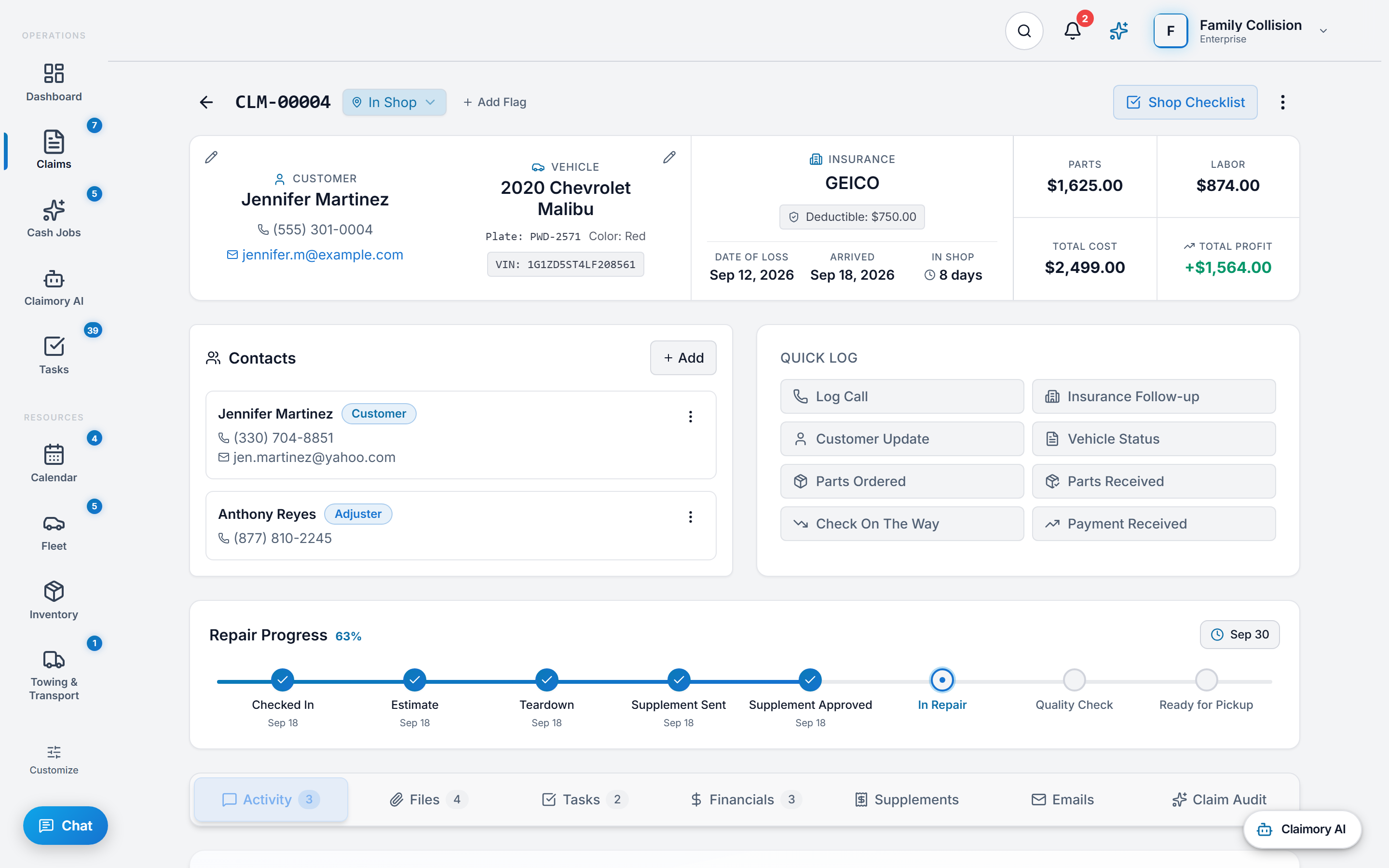
Every car gets a single file. Photos, estimates, supplements, emails, texts, payments, all attached to it. No more 'which folder did I save that in.' No more lost attachments.
Claimory is a claims management platform built for collision repair shops that handle insurance claims. It tracks every claim from first notice of loss through teardown, supplement submission, adjuster approval, repair, invoicing, and final payment in one timeline. Claimory works alongside estimating tools like CCC ONE and Mitchell, it does not replace them. Built-in AI reads the full claim record to flag missed line items, draft adjuster emails in the shop's voice, and surface aging supplements before money is lost. Plans start at $49.99 per month with a 14-day free trial.
Every vehicle in the shop becomes a Claim Workspace, a single timeline where every photo, file, message, supplement, and dollar lives, accessible to every team member who needs it.
Built for collision repair shops across the US
Why Claimory exists
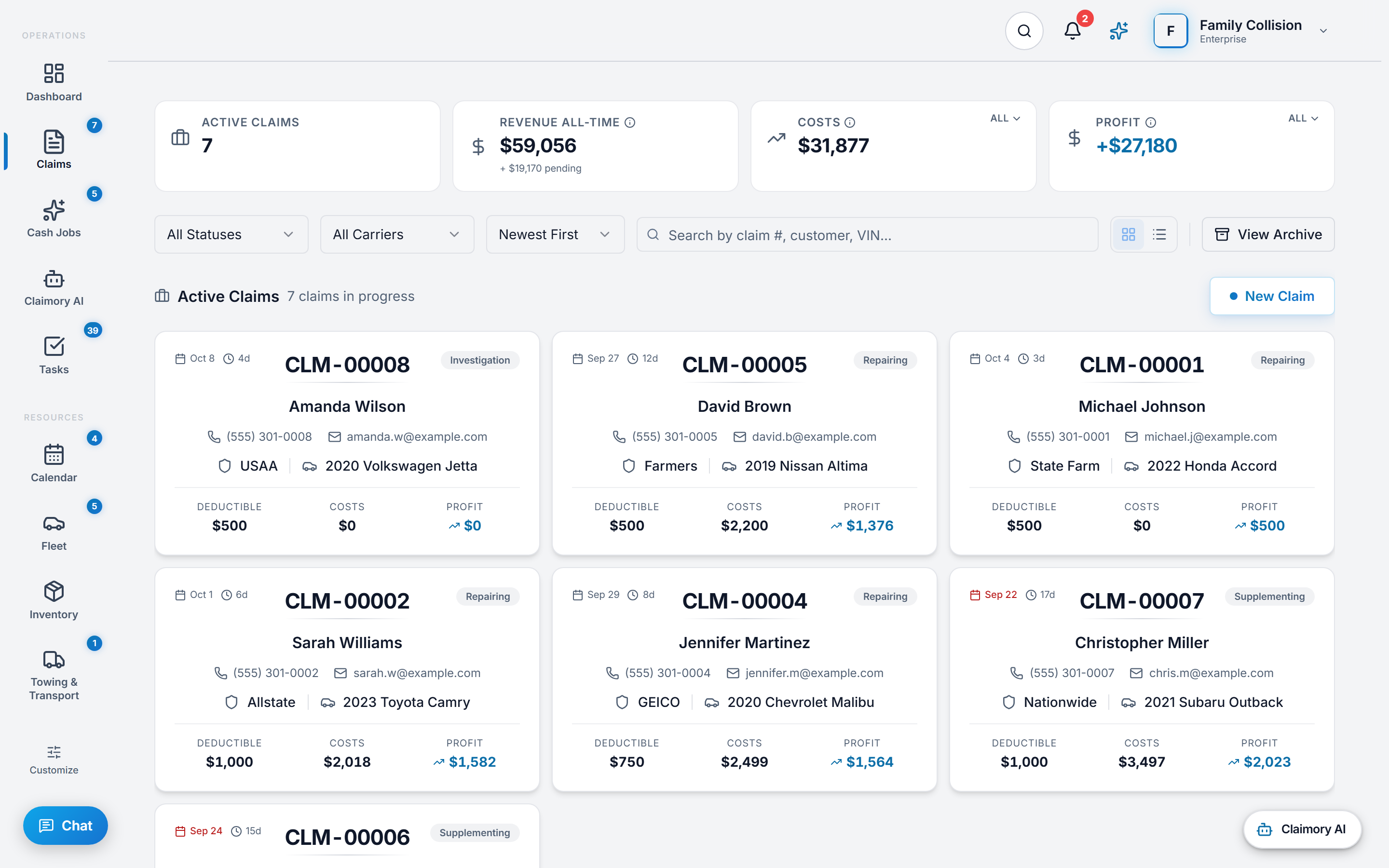
Collision shops stop losing money to missed supplements, dropped adjuster follow-ups, and slow cycle times when every claim lives on one timeline. Claimory exists to recover the supplement revenue most shops leave on the table.
You already have CCC ONE or Mitchell. They write parts and labor. They do not run the claim. Claimory is what runs the claim. From the first call your office takes, through every supplement, every adjuster email, every customer text, every photo, all the way to the final check posting in your bank account. One file. One timeline. One source of truth for everyone who touches the car.
Pillar 1
Every car gets a single file. Photos, estimates, supplements, emails, texts, payments, all attached to it. No more 'which folder did I save that in.' No more lost attachments.
Pillar 2
The system watches every supplement and every approval. If a carrier is sitting on a request for 5 days, it pings. If a customer has not signed the release, it pings. If the deductible was never collected, it pings. Money does not slip through.
Pillar 3
Customers see their car on a private link. Adjusters get clean, professional emails. Your team sees the whole pipeline on one board. Phone calls drop sharply once customers can see status for themselves.
Built for collision repair shops
Claimory was founded by Artur A., Founder & CEO, based in Los Angeles. Every screen and workflow in Claimory is shaped by what collision shops actually need when the phone is ringing and the car is still on the lift.
Claimory is designed for collision repair shops that handle insurance claims - body shops, collision centers, and multi-location repair operations. It serves shop owners, managers, estimators, and front desk staff who need better visibility into claim status, supplement tracking, and daily workflow.
Claimory is not designed for general auto repair shops that primarily do oil changes, brake jobs, or diagnostics. If your shop does not handle insurance claims and supplements, tools like Shopmonkey or Tekmetric are a better fit.
A first-class pillar of Claimory
Customer experience is treated with the same depth as claims operations, AI, and supplement recovery in Claimory. The platform was built around an operator truth: the modern collision customer wants to know what is happening with their car without making a phone call, and the front desk wants its day back. The customer portal, QR repair tracking, and e-signature ship out of the box starting on Professional at $129.99 per location per month. Claimory customer texting is part of Professional with the $9.99/month texting add-on and turns on once carrier registration for business texting is completed.
The full Claimory collision repair customer experience layer covers the auto body shop customer portal, QR-code repair tracking, a connected mailbox for adjuster and customer email, status emails, e-signature for authorizations and releases, customer uploads into the claim, and customer texting from the shop's own number once carrier registration is completed. Every surface threads back to the claim record, so the operator never works from a stranded inbox or someone's personal phone.
What this replaces in the shop: the daily “where is my car?” calls collapsing to the handful that actually need a person, front-desk hours burned re-typing the same status into three surfaces, trust gaps that turn into one-star reviews because the customer felt out of the loop, and DRP customer satisfaction scores that drop during peak load. If your front desk fields 3 to 6 status calls per day at 4 minutes each, that is roughly 4 to 9 hours a month once customers check the Claimory status page instead of calling. Run your own call count to see what your shop reclaims.
Token QR portal, no login
The customer scans the work-order QR code with any phone camera or opens the emailed link, confirms the claim number and last name, and the Claimory status page opens. No app and no password reset call. On every plan including Starter.
Customer texting via Telnyx
A texting number per shop, not a shared shortcode, set up by Claimory. Switched off for every shop today while carrier registration for business texting is completed.
Connected email hub
Gmail or Outlook over OAuth. Adjuster and customer emails file onto the matching Claimory claim. Outbound email sends from the shop's own address, and Claimory AI drafts replies a person approves.
E-signature where it matters
Authorization to Repair, Direction of Pay, Vehicle Storage Agreement and Final Delivery Acceptance go out as a Claimory signing link the customer signs on any phone, and the signed PDF is filed on the claim.
Customer uploads
From a free Claimory customer account, damage photos and insurance documents land on the claim's Files tab, not the front desk inbox.
Repair progress gauge
The Claimory status page gauge moves as the shop ticks off each repair step on the claim, so the customer sees progress without calling.
Why operators pick Claimory on customer experience
Claimory tracks every insurance claim from first notice of loss through teardown, supplement, approval, repair, invoicing, and final payment in one timeline.
Claimory records each supplement on the claim with its requested and approved amounts and its status, lists open supplements in an optional dashboard panel, and runs Claim Audits that flag lines the estimate may have missed before the supplement goes to the carrier.
Claimory assigns each task to a team member on a claim, a cash job or the shop, and the task board and list show what is overdue and what is due today, so no one needs a status meeting or a group text.
Claimory gives each customer a no-login status page, opened from a QR code or an emailed link after they confirm their claim number and last name, sends status emails to customers with a free account, and emails signing links for documents. Texting from the shop's own number opens once carrier registration for business texting is completed.
Claimory reports revenue and expenses, cycle time for the shop and for each carrier, a carrier scorecard with payment speed, on-time payment rate and supplement rate, unpaid invoices by age, and a monthly P&L.
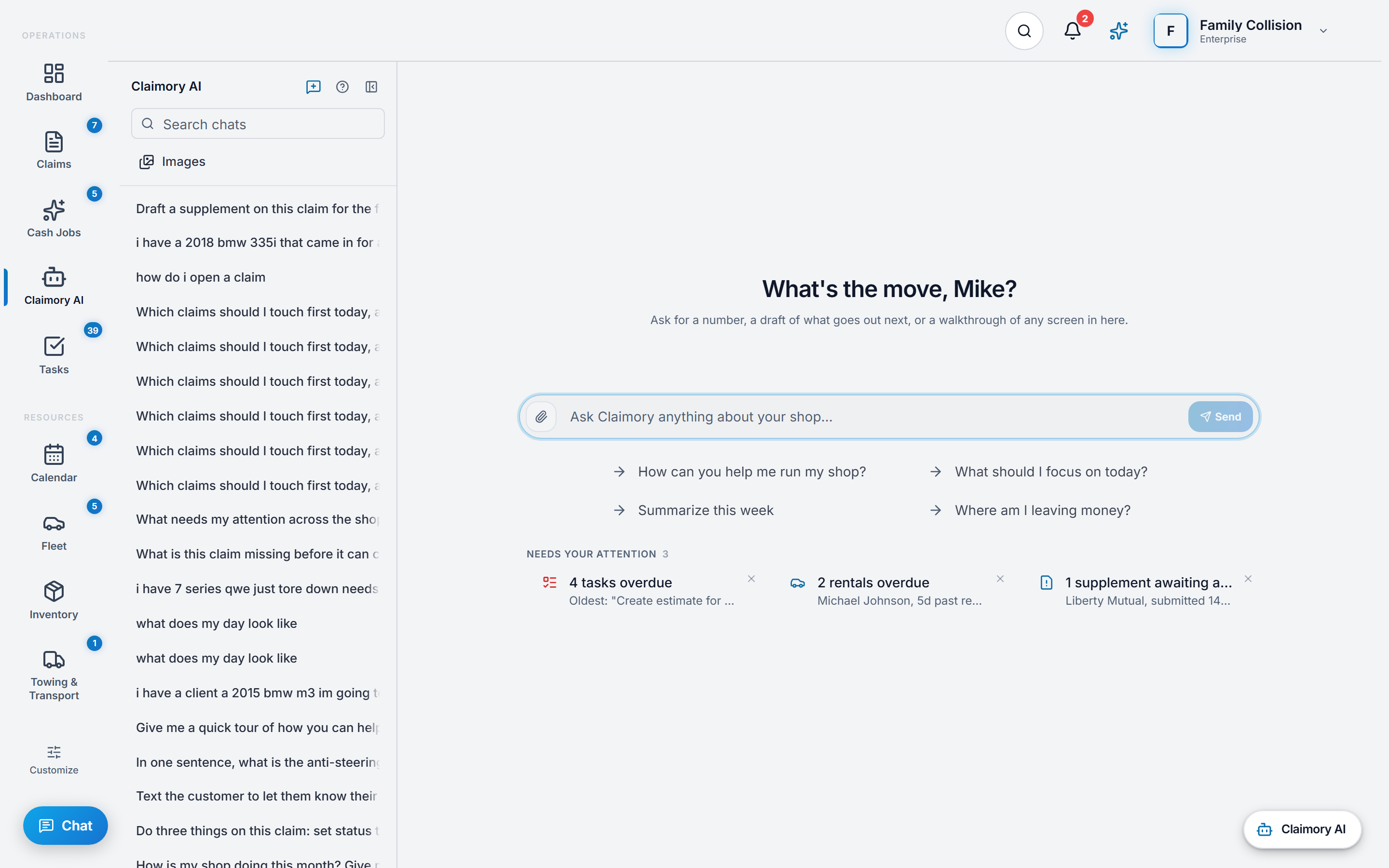
Claimory AI answers questions about the claim on screen, drafts emails from the claim record, and runs Claim Audits that flag missed line items. A person approves every message, and Claimory AI sending stays off until the workspace owner turns it on.
The full capability manifest
Claimory's capabilities in seven groups. Every entry describes what a shop can use in Claimory today, and an entry for something switched off says so. No roadmap.
Recover more money on every claim with AI
Claimory ships a full AI layer that reads the actual claim record before it answers. Claimory AI works from the claim on screen, and a Claim Audit ties every finding to a photo, an estimate line or a document on that claim. Nothing leaves the shop without a human approval.
Group 01 of 07 · 9 capabilities
Claim Audits
A Claimory Claim Audit reads the claim's estimate lines, photos, attached PDFs, vehicle, carrier and the shop's own history with that carrier, and flags missed labor operations, blend time, R&I, OEM procedures and supplement opportunities, each with the source behind it. Claim Audit never edits the estimate; the estimator copies the findings worth sending.
Claimory AI on the claim
Asked about an open claim, Claimory AI answers from that claim's notes, tasks, files, payments, costs, supplements, labor lines and contacts. Each Claimory AI conversation is saved to the account of the person who started it.
AI email drafts for adjusters
Claimory AI drafts supplement requests, parts-delay notices and pickup emails from the claim record and the email thread. A person reviews each draft and sends it from the shop's connected Gmail or Outlook mailbox, and Claimory AI sending stays off until the workspace owner turns it on.
AI rewrite for customer texts (switched off today)
The Claimory SMS Center rewrites a customer text for tone and clarity before a person sends it. The SMS Center opens once carrier registration for business texting is completed, so the rewrite is not in use today.
AI document parser
Claimory reads an estimate or supplement PDF uploaded to a claim into a numbered estimate version with its line items, totals, vehicle and labor rates. It pairs with CCC ONE and Mitchell import of XML, EMS and CIECA files.
AI photo description
Asked from the Claimory AI panel, Claimory AI describes the damage in a claim photo in a few sentences and saves that description on the photo. It does not write line items.
Claim Audit balance and usage alerts
The Claimory AI panel header shows the Claim Audits left, the Billing page shows the balance and the next monthly top-up, and Claimory sends an email when a monthly meter passes 90 percent.
Confidence and sources on every finding
Each Claimory Claim Audit finding carries a confidence score, approval odds, a dollar value and the photo, estimate line or document it rests on. Findings under 60 percent confidence are dropped, and findings at 85 percent or higher are listed under Send these today.
Carrier outcomes feedback loop
When a supplement is marked approved, partially approved or denied, Claimory records that carrier's outcome, and the next Claim Audit for the same carrier reads the shop's own approval history with it.
Where shops actually leak revenue
Most collision shops leave real supplement revenue on the table every month through missed supplements and unpaid receivables. Claimory ships tooling for the places that money disappears: supplement records on every claim, margin visibility, expense anomaly detection, payment aging and Claim Audit citation packages.
Group 02 of 07 · 8 capabilities
Open supplements panel
A Claimory dashboard panel on Professional and up lists the five most recent open supplements with the claim number, carrier, amount and status. Claimory does not send supplement aging alerts today.
Per-claim margin and profitability
The claim's Financials tab in Claimory measures the parsed estimate and approved supplements against what the job actually cost in labor, parts, paint and materials, and sublet, with received, outstanding and profit, so the owner sees margin before the car rolls out.
Claim Audit citation package
The Supplement package tab of a Claimory Claim Audit report holds the audit summary with the OEM procedure citations, state regulations and policy clauses behind it, ready to copy or save to the claim's files.
Estimate vs actuals on the claim
An Estimate vs Actuals card on the Claimory claim compares what the estimate said with what the shop spent, by labor, parts, materials and sublet, so the lines where the original estimate was light stand out.
Cost-per-claim benchmark
The Claimory Financial Center shows the shop's average cost per claim for the selected period, so a month that ran expensive stands out.
Expense anomaly detection
Claimory flags an expense that runs at twice its category's average and picks out recurring vendor charges, so a slow margin leak shows up before it compounds.
Recurring expense forecast
Claimory projects the shop's recurring expenses against its average monthly revenue and warns when recurring expenses exceed 60 percent of it.
Payment aging tracker
The Claimory Financial Center groups unpaid invoices into 0 to 30, 31 to 60, 61 to 90 and over 90 days, so an invoice past 60 days is in plain view.
Cut status calls without dropping the customer
A no-login Claimory status page from a QR code or an emailed link, a free customer account for uploads and the deductible, status emails and e-signature, so customers know where their car is without calling the front desk.
Group 03 of 07 · 7 capabilities
Token QR customer portal (no login)
The customer scans the Claimory QR code on the work order or opens the emailed link, confirms the claim number and last name, and sees the claim status and repair progress. No app install and no password.
Repair progress gauge
The Claimory status page shows the vehicle, the insurance company, the claim status and a progress gauge that moves as the shop ticks off each repair step on the claim. It shows no dollar amounts.
Customer texting (switched off today)
Claimory texting from the shop's own number, set up through Telnyx, with STOP replies handled on the server. It is switched off for every shop while carrier registration for business texting is completed.
Customer photo uploads
From a free Claimory customer account, customers send damage photos and documents from their phone, and each file lands on the claim's Files tab, not the front desk inbox.
E-signature for authorizations and releases
The shop sends a Claimory signing link or signs in person for documents such as Authorization to Repair, Direction of Pay, Vehicle Storage Agreement, Total Loss Vehicle Release and Final Delivery Acceptance, and the signed PDF is filed on the claim.
Deductible and invoice view
The free Claimory customer account shows the insurance deductible recorded on the claim and when it is due. Where the shop takes card payments through Claimory, the customer pays the shop's invoice from the same view, with the funds going to the shop.
Status emails to customers
Claimory emails a customer with a free account when the claim's status changes, on by default, and the shop can switch automatic customer emails off for the whole workspace in Settings.
Coordinate the shop without a daily standup
Every internal coordination surface a collision shop runs on, from the claim record to towing to loaners to cash jobs. Role-based, audit-logged, and built so the production manager can run the board from a phone.
Group 04 of 07 · 13 capabilities
Claim record (full schema)
The Claimory claim record holds the VIN, customer, vehicle, status, priority, vehicle location, key dates, dollar fields and deductible, with an audit trail of every status change. The shop-floor source of truth.
Role-based access, eight permissions deep
Claimory's five roles (Super Admin, Org Admin, Manager, Estimator, Technician) sit over eight permissions the owner can edit, resolved per workspace by a database function rather than client-side checks. Org Admin and Manager start with all eight, an Estimator with five and a Technician with none.
Workspace invites and role assignment
A Claimory invitation goes to an email address with the role chosen up front and an expiry attached, and a pending invitation can be resent or revoked. SAML single sign-on is available on request for Enterprise accounts (contact sales).
Calendar and scheduling
One shared Claimory calendar per shop in month and week views, holding deliveries, appointments, follow-ups, events and open task due dates, with a filter chip for each. Entries are filed by date and do not repeat.
Automation, stated plainly
Claimory has no rule builder that creates tasks when a claim status changes. The one automation that writes work into the app is the AI Claim Audit, which turns a finding marked critical or high priority, or worth $200 or more, into a task on that claim.
Tasks on a board or a due-date list
A four-column drag-and-drop board, a list grouped by what is overdue and what is due today, and Task per Claim to write one task onto every active claim at once. The production manager runs the board from a phone.
Audit trail on every claim
Claimory records each claim's creation, every status change with the old and new status, and each archive, with who did it and when.
Inventory and parts orders
Claimory inventory items carry reorder points, a low-stock view and mobile barcode scanning, and each manual stock adjustment is noted on the item with its reason and date. Parts orders go to a vendor with an expected date and are received into stock; a parts order is not tied to a claim.
Total loss workflow
The Claimory total loss builder switches on standard storage, tow and release fee lines, takes editable rates and custom charges, files a branded PDF on the claim, and emails it to the adjuster, a tow driver or any address.
Fleet management and rentals
Claimory tracks each loaner car and the rentals against it, links a rental to its claim, sends the rental agreement as a signing link, flags overdue rentals and upcoming insurance, registration and service dates, and keeps a car's car-sharing listing as a reference.
Towing records
Each Claimory tow is a numbered record with pickup and drop-off, scheduled and actual times, the cost and the customer charge, run by the shop's own truck and driver or a subcontracted provider. A tow linked to a claim writes its cost onto that claim, and any tow generates a PDF invoice.
Cash job pipeline (separate from insurance)
Claimory keeps customer-pay work as its own record with quotes, a deposit milestone, per-job payments and costs, and projected and realized profit. Reporting stays clean because cash jobs stay off the claim board and out of carrier reporting.
Global search
Claimory search from any screen finds a claim by claim number, customer, VIN, plate, carrier or vehicle, plus cash jobs, tasks, files, estimates, supplements, payments, vendors, parts, loaners, tows, calendar entries and team members.
Run the business on data, not gut feel
Real-time dashboards, exportable reports, and finance tooling built for collision shops, not for general accounting. Branded PDFs, accountant-ready exports, and a carrier scorecard built from the shop's own claims for DRP conversations.
Group 05 of 07 · 10 capabilities
Modular configurable dashboard
On Professional and up, each Claimory user adds, removes and reorders dashboard panels, and the layout is saved for that user in that shop, so an owner of several shops can arrange each location differently.
Claim metrics at a glance
The Claimory Command Center shows active claims, average cycle time with the average age of open claims, month-to-date revenue against last month, active technicians and a claims-by-status breakdown.
Cycle time tracking
Claimory measures days from job start to job finish on each claim, with a shop-wide average, per-carrier rollups and a Cycle Time tab showing the fastest and slowest jobs and the open jobs waiting longest. The metric DRP carriers measure most.
Carrier scorecard for DRP decisions
The Claimory carrier scorecard gives each carrier with at least three claims its average cycle time, average days to payment, supplement rate, on-time payment rate and average revenue per completed claim, so DRP decisions run on the shop's own data.
Monthly P&L for the bookkeeper
The Claimory Financial Overview builds a profit and loss statement for the selected period and exports it as a PDF, so a bookkeeper or accountant can use it without a workspace seat.
Tax and compliance reports
A Claimory tax reports tab with PDF and CSV exports, the shop's tax rate in Settings, and a tax reminder card for quarterly deadlines.
Financial calendar heatmap
A Claimory calendar heatmap of payments received and expenses by day, so cash flow patterns are visible at a glance.
Branded PDF exports
Claimory puts the shop's logo and colors on estimate, invoice, claim report, financial report and total loss PDFs, alongside Claimory branding on Professional and in place of it on Elite and Enterprise. Starter PDFs carry Claimory branding.
Excel and CSV exports
The Claimory Export Center produces claims, payments, financial summary, carrier scorecard and technician performance reports as PDF, Excel or CSV, and the revenue, expense and payroll ledgers export to CSV.
Accountant exports
Claimory exports a financial summary CSV and a claim profitability CSV for the bookkeeper or CPA, plus CSVs labeled for QuickBooks and Xero from the tax reports tab, so the accountant gets the numbers without a workspace seat.
Pairs with the tools you already use
Claimory plugs into estimating systems, mailboxes, a texting provider, payment processing, and cloud storage so the shop keeps its existing stack and gains the operational layer it was missing.
Group 06 of 07 · 8 capabilities
Gmail and Outlook OAuth
Claimory connects the shop's Gmail or Outlook mailbox, files an email on the claim's Emails tab when the claim number, customer email or adjuster email matches with confidence, suggests the claim when the match is close, and sends from the shop's own address.
CCC ONE and Mitchell estimate import
Claimory imports a CCC ONE or Mitchell estimate exported as PDF, XML, EMS or CIECA, shows the parsed lines next to a preview of the file, and saves them to the claim. An Audatex estimate PDF is read the same way. Claimory pairs with these estimating systems and does not replace them.
Customer texting through Telnyx (switched off today)
A texting number per shop, set up by Claimory through Telnyx, so a shop needs no Telnyx account of its own. Claimory texting is switched off while carrier registration for business texting (A2P 10DLC) is completed.
Stripe payments and billing
Stripe runs the shop's Claimory subscription and plan changes, and Claimory records each Stripe event once, so a Stripe retry never applies a plan change or payment twice. A shop that takes card payments through Claimory is paid by customers from the free customer account.
Insurance carriers on every claim
Any insurance carrier is typed on the Claimory claim with no setup, and the Claimory claims list filters by carrier.
Cash job pipeline (data-isolated)
Claimory keeps customer-pay cash jobs, their payments and their costs in records of their own, so insurance KPIs never get polluted by retail revenue.
Supabase-backed cloud storage
Claimory stores claim files, customer uploads, photos and signed documents in cloud storage scoped to the shop, with Postgres row-level security on every workspace table.
Resend transactional email
Welcome, trial, lockout, and win-back emails sent through a deliverability-grade transactional provider, separate from the shop's own outbound mailbox.
Built for shops that handle customer and carrier data
Postgres row-level security, encrypted tokens, a claim audit trail and a security event log, claim and estimate export, and a self-serve delete-account flow. The shop's data stays the shop's data.
Group 07 of 07 · 9 capabilities
Row-level security on every workspace table
Claimory turns on Postgres row-level security on every table that holds shop data, so the database checks each query against the signed-in user's workspace, a second layer behind the app's own checks.
Role-based access control
Super Admin, Org Admin, Manager, Estimator and Technician roles over eight permissions, with role changes made through a checked database function rather than a direct table edit.
Two-factor authentication
Turn on TOTP two-factor authentication from Account settings to require a one-time code at sign-in.
Security event log
A separate Claimory security log records role assignments and removals, claim archives and deletions, data deletion requests, API key changes, and failed authentication on protected requests, kept for 90 days.
Encrypted OAuth token storage
Gmail and Outlook tokens are encrypted at the column level, and platform secrets are encrypted with a key held in the database vault.
Rate limiting and bot checks
Trial and invitation sign-ups, contact forms, shared file links, signing links and API keys are rate limited, and public sign-up and contact forms add a bot check.
Export your records anytime
Workspace owners can export claim and estimate records as PDF and CSV at any time. No lock-in, no extraction fee. Every account holder can self-serve download a machine-readable JSON copy of their account data from Settings, and for a full copy of your account data you can also contact us.
Cookie consent and delete-account flow
A GDPR-style cookie consent banner and a self-serve Claimory delete-account flow. Copies held in backups clear within 90 days, as the Claimory privacy policy states.
No AI training on claim data
The Claimory privacy policy commits that customer claim data is never used to train any third-party AI or machine-learning model. The data stays the shop's data.
Want the per-feature deep dive with the code path behind each item? See the full feature index, organized into ten categories.
Claimory does not replace your estimating system. It manages the workflow layer that estimating systems were never built to handle.
CCC ONE and Mitchell
These tools write estimates. Claimory manages everything that happens after the estimate - supplements, approvals, workflow, team coordination, and payment tracking.
Shopmonkey, Tekmetric
These are built for general auto repair (oil changes, brakes, diagnostics). Claimory is built specifically for collision repair shops handling insurance claims and supplements.
Excel, Google Sheets, dry-erase boards
Claimory replaces manual tracking with structured, searchable, real-time claim records that the whole team can access from any device.
A collision claim moves through seven distinct phases. The shops that get paid the fastest treat each phase as its own checkpoint, not as a blur. Here is what each phase looks like and where Claimory plugs in.
When a vehicle arrives, the office logs the customer, vehicle, insurance carrier, claim number, policy details, and date of loss. In Claimory, this becomes a single claim record that every downstream action references. No double entry into a separate spreadsheet, no sticky note on the front desk, no orphaned data when the original taker is off that day.
Photos and the initial estimate go onto the claim. The carrier estimate is usually written in CCC ONE or Mitchell, and Claimory imports that estimate file onto the claim and reads its line items, so anyone can pull up the working estimate without digging through email or shared drives.
Once teardown begins, hidden damage emerges and the shop writes supplements. Claimory records each supplement separately on the claim: the requested amount, the lines added, the status, when it was submitted and how long the carrier took to respond. A Claim Audit run on the claim flags lines the estimate may have missed before the supplement goes out.
The shop chases the carrier for supplement approval, additional photos, sublet authorization, or part substitution decisions. In Claimory, email with the adjuster from the shop's connected Gmail or Outlook mailbox files onto the claim's Emails tab, and a phone call is logged as a note on the claim, so when another team member picks up later, the history is right there.
Body, paint, mechanical, and reassembly happen in stages. Claimory tracks eight repair steps on every claim (Pictures, Estimate, Teardown, Supp Sent, Supp Appr, Started, Completed, Delivered), ticked off by the team, so the front desk can answer customer status questions without walking out to the shop floor. Customers see that progress on their Claimory status page.
Before the customer comes to pick up, the shop runs its final inspection: alignment verified, panels gapped, paint cleared, recalibration confirmed where required. Final photos go onto the Claimory claim record so the file is complete if a carrier audits it later.
The final bill combines the original estimate plus every approved supplement. Claimory records each insurance and customer payment on the claim, the claim's Financials tab shows what has been received and what is outstanding, and the Financial Center groups unpaid invoices by age, so a balance does not slip past 60 days unnoticed.
Collision repair has its own vocabulary. These are the terms you will hear from adjusters, see on estimates, and work against every day inside Claimory.
Enter vehicle, customer, and insurance details. Claimory creates a complete claim record linked to all parties.
Log initial estimates and supplements. Monitor submission dates, approval status, and amounts in real time.
Assign tasks, tick off repair steps on the claim, and use Task per Claim to put one task on every active claim. Everyone sees what needs attention.
A Claimory status page opened from a QR code or link, plus status emails to customers with a free account, so customers know their repair status without calling.
Confirm the supplements are answered, record insurance and customer payments on the claim, and keep the claim's audit trail of status changes.
Four plans · Starter $49.99, Pro $129.99, Elite $349.99, Enterprise custom
No credit card. Works with CCC ONE and Mitchell.
The questions collision shop owners ask most often when they are evaluating Claimory.
Claimory is a claims management platform built for collision repair shops that handle insurance claims. It tracks every claim from first notice of loss through teardown, supplement submission, adjuster approval, repair, invoicing, and final payment in one timeline. Claimory works alongside estimating tools like CCC ONE and Mitchell, it does not replace them. Built-in AI reads the full claim record to flag missed line items, draft adjuster emails in the shop's voice, and surface aging supplements before money is lost. Plans start at $49.99 per month with a 14-day free trial.
Claimory is used by independent collision repair shops, body shops, and multi-location collision operations that process insurance claims. Owners, office managers, production managers, and estimators use it daily. Shops doing 15 to 150 insurance claims per month are the sweet spot.
CCC ONE and Mitchell are estimating systems. They write the damage estimate. Claimory is a shop management platform that manages everything that happens around the estimate: supplement tracking, adjuster follow-up, team task assignments, customer updates, cycle time reporting, and final payment. Claimory works alongside CCC ONE and Mitchell and does not replace them.
Shopmonkey and Tekmetric are built for general auto repair shops that do oil changes, brakes, and diagnostics. Claimory is built exclusively for collision repair shops that handle insurance claims, supplements, and DRP work. Collision workflows, supplement tracking, and adjuster communication are native to Claimory, not a general auto repair shop tool.
Claimory plans start at $49.99 per month for the Starter plan. Professional is $129.99 per month, Elite is $349.99 per month, and Enterprise is custom pricing for multi-location shops. Every paid plan includes free setup and a 14-day free trial with no credit card required.
Yes. Claimory is a responsive cloud platform that runs on any phone, tablet, laptop, or desktop browser. Technicians, estimators, and office staff use Claimory from the shop floor on their phones. Customers receive a mobile-friendly status portal accessible by link or QR code.
Claimory setup takes minutes, not weeks. Free setup is included on every plan. You can be tracking your first supplement within minutes of signup. No migration from CCC ONE or Mitchell is required because Claimory works alongside your estimating system.
Collision shop management software is a platform built specifically for auto body shops that handle insurance claims. It covers the operational layer between the estimate and the final payment check.
It tracks each claim through teardown, supplement submission, adjuster approval, repair, invoicing, and delivery. Unlike estimating tools such as CCC ONE or Mitchell, which focus on writing the damage estimate itself, a shop management platform manages everything that happens around the estimate: customer updates, team task assignments, supplement follow-ups, cycle time reporting, and carrier communication.
Claimory is one such platform, built by collision repair operators and purpose-designed for the insurance claim lifecycle from first notice of loss to final payment.